
Have you ever wondered why JavaScript is single-threaded (meaning it can only do one task at a time) yet still manages to handle asynchronous tasks like timers or network requests without blocking the execution of other code? What exactly are Promises, and can JavaScript really “await” execution? This blog will help answer these questions. Let’s dive in!
1. Event loop
The first thing we need to talk about is the event loop. But what is the event loop, and why is it so important in JavaScript for handling multiple tasks?
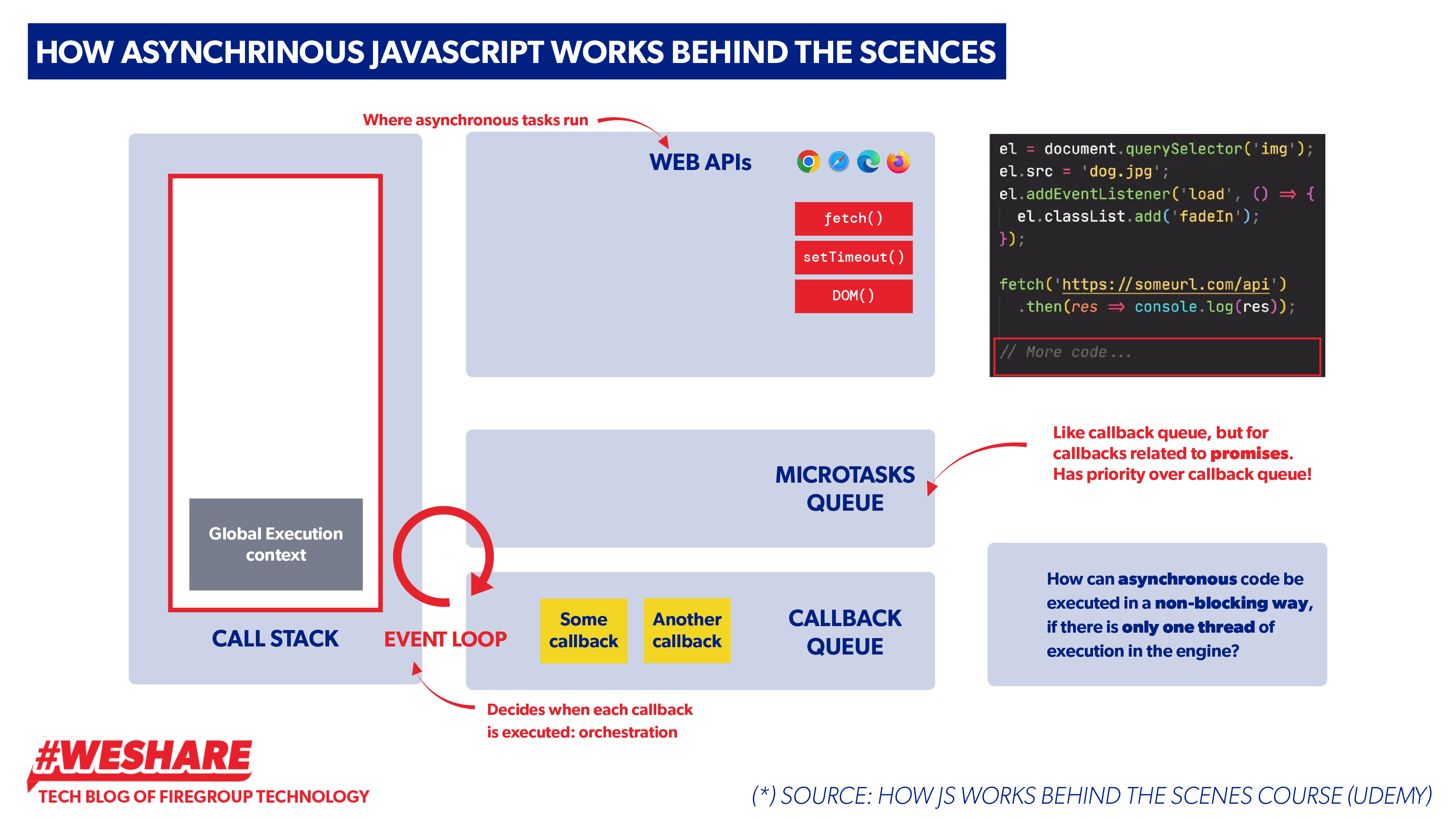
Simply put, the event loop in JavaScript is a fundamental mechanism that handles asynchronous operations, allowing JavaScript to be non-blocking and single-threaded. Here’s a breakdown of how it works:
Source: Udemy
Javascript only has 1 main thread called Call stack that executes the synchronous code.
When JavaScript encounters an asynchronous operation, such as setTimeout, fetch, or event listeners, it offloads these tasks to Web APIs (provided by the browser). These APIs handle the tasks in the background, allowing JavaScript to continue executing other code without waiting for the asynchronous task to complete.
Once the asynchronous operation completes, its callback is moved to the callback queue (FIFO)
- The event loop continuously monitors both the call stack and the callback queue.
- If the call stack is empty (meaning JavaScript is not executing any synchronous code), the event loop takes the first callback from the callback queue and pushes it onto the call stack for execution.
console.log(“Start”);
setTimeout(() => {
console.log(“Timeout”);
}, 0);console.log(“End”);
//Output
Start;
End;
Timeout;
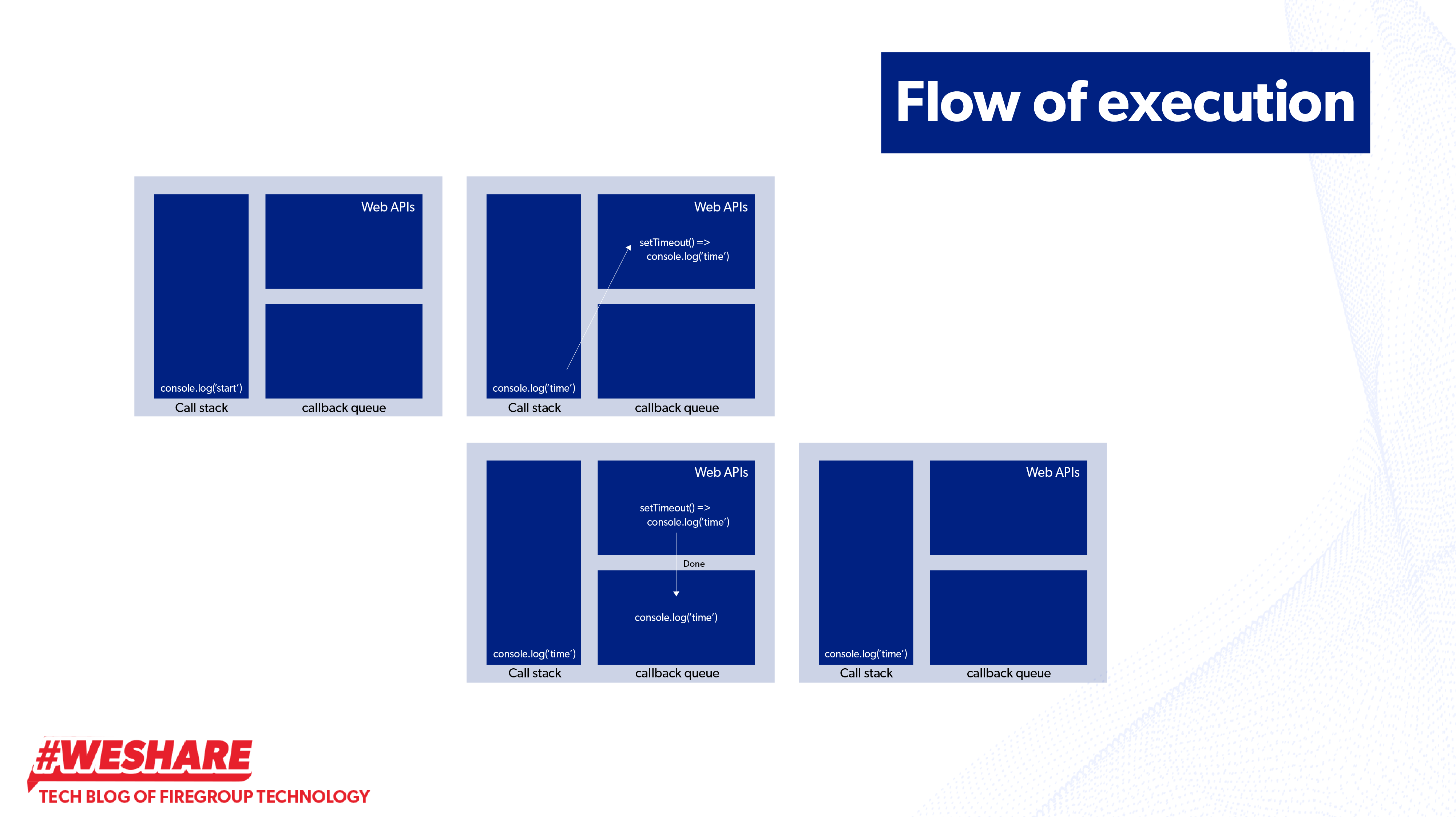
For example, even if setTimeout is set with a delay of 0 milliseconds (meaning no delay), its callback still executes after console.log(“End”). This happens because setTimeout is an asynchronous operation. When the delay completes, its callback function (console.log(“Timeout”)) is pushed into the callback queue.
Meanwhile, JavaScript continues executing the next synchronous code in the call stack, which is console.log(“End”). Once the call stack is empty, the event loop checks the callback queue. When it finds console.log(“Timeout”) in the queue, it pushes it onto the call stack for execution.
Flow of execution
If you have noticed, there is a queue that we didn’t mention earlier: the microtasks queue. So, what is it?
Technically, the microtasks queue is similar to the callback queue but has higher priority. This means that after the call stack becomes empty, the event loop first checks if there are any tasks in the microtasks queue. The event loop will empty the microtasks queue entirely before moving on to the callback queue.
So, what tasks get pushed into the microtasks queue? Let’s take a look at the code snippet below.
console.log(“Start”);
setTimeout(() => {
console.log(“Timeout callback”);
}, 0);Promise.resolve().then(() => {
console.log(“Promise resolved”);
});console.log(“End”);
// output
Start
End
Promise resolved
Timeout callback
Why does console.log(“Promise resolved”) print before console.log(“Timeout callback”)?
Because setTimeout’s callback will be placed in the callback queue. The Promise.resolve().then() callback is added to the microtasks queue. The microtasks queue has higher priority than the callback queue. This means that even though setTimeout was scheduled first, the Promise.resolve().then() callback is placed in the microtasks queue, which is processed before the callback queue.
Here is common scenarios that push tasks into the microtasks queue
Promises:
- When a promise is resolved or rejected, any .then(), .catch(), or .finally() callbacks are added to the microtask queue.
- For example: the callback in .then() will go to the microtask queue.
Promise.resolve().then(() => console.log(“Promise resolved”));
Mutation Observers:
- The MutationObserver API allows you to observe changes to the DOM. When changes are detected, the observer’s callback is pushed to the microtask queue.
- Example:
const observer = new MutationObserver(() => console.log(“DOM changed”));
observer.observe(document.body, { childList: true });
- Any changes detected by the observer will result in the callback going to the microtask queue.
QueueMicrotask
- JavaScript provides a function, queueMicrotask(), to explicitly push a function to the microtask queue. This is useful when you need to ensure that a task executes immediately after the current script and before any tasks in the callback queue.
- Example:
queueMicrotask(() => console.log(“Microtask queued”));
2. Promise
As we mentioned above, Promises are one of the tasks that get pushed into the microtasks queue. As a JavaScript developer, you may often work with Promises to handle network requests, APIs, and other asynchronous operations.
Now, let’s dive deeper into how Promises work and why they are essential in JavaScript.
Definition of Promise
Promise is an object that is used as a placeholder for the future result of an asynchronous operation and executes code based on whether the operation is completed successfully or with an error. In other words, promise is a container for future value
Promise has 3 statuses: pending, fulfilled, and reject
- Pending: The initial state, where the promise is neither fulfilled nor rejected.
- Fulfilled: The operation is completed successfully, and the promise is resolved with a value.
- Rejected: The operation failed, and the promise was rejected with an error.
How to create a promise:
A Promise is created by instantiating the Promise object and passing in a function called the executor function. This function takes two arguments:
- resolve: a function to call when the asynchronous operation succeeds.
- reject: a function to call when the asynchronous operation fails.
const fetchData = new Promise((resolve, reject) => {
const data = “Some data”;
const success = true;setTimeout(() => {
if (success) {
resolve(data); // Resolve the promise with the data
} else {
reject(“Error fetching data”); // Reject the promise with an error message
}
}, 1000);
});
To handle the result of a Promise, we use .then(), .catch(), and .finally() methods:
- .then(): Executes when the promise is fulfilled. It receives the resolved value.
- .catch(): Executes when the promise is rejected. It receives the error.
- .finally(): Executes regardless of the promise’s outcome (fulfilled or rejected).
fetchData
.then(result => {
console.log(“Data received:”, result);
})
.catch(error => {
console.log(“Error:”, error);
})
.finally(() => {
console.log(“Fetch attempt complete”);
});
How Promises Work Internally
- Promise Creation: When a promise is created, it starts in the pending state. Inside the executor function, you define the asynchronous task. resolve and reject are functions that can be called to indicate the outcome of the task.
- Asynchronous Task Execution: While the task is running, the promise remains in the pending state. Once the asynchronous task completes: If successful, resolve is called with the result, changing the promise’s state to fulfilled. If it fails, reject is called with an error message or object, changing the promise’s state to rejected.
- Microtask Queue: When the promise settles (either fulfilled or rejected), the corresponding .then() or .catch() callback is placed in the microtask queue. The JavaScript event loop ensures that microtasks are executed after the current call stack is empty but before moving on to tasks in the callback queue (e.g., from setTimeout).
Promise combinators
- Promise.all([Promises])
Arguments: An array of Promises.
Runs all the given Promises concurrently. The result is an array of resolved values from each Promise. If any Promise in the array is rejected, Promise.all returns an error and stops further execution.
Promise.all([fetchData(), fetchOtherData()])
.then(results => {
console.log(results); // Array of resolved values.
})
.catch(error => {
console.error(error); // If any Promise fails, this will catch it.
});
- Promise.race([Promise])
Arguments: An array of Promises.
Runs all the given Promises concurrently and returns the result of the first Promise to either resolve or reject.
Promise.allSettled([fetchData(), fetchOtherData()])
.then(results => {
results.forEach(result => {
if (result.status === ‘fulfilled’) {
console.log(‘Resolved:’, result.value);
} else {
console.log(‘Rejected:’, result.reason);
}
});
});
To check the status of Promises (whether they are pending, fulfilled, or rejected). This method returns an array with the status and results of each Promise once all of them have settled (either resolved or rejected).
const promise1 = Promise.resolve(10);
const promise2 = new Promise((resolve, reject) => setTimeout(reject, 1000, ‘Error’));
const promise3 = new Promise((resolve) => setTimeout(resolve, 500, ‘Success’));
Promise.allSettled([promise1, promise2, promise3])
.then(results => {
results.forEach((result, index) => {
console.log(`Promise ${index + 1}:`);
console.log(`Status: ${result.status}`);
if (result.status === ‘fulfilled’) {
console.log(`Value: ${result.value}`);
} else if (result.status === ‘rejected’) {
console.log(`Reason: ${result.reason}`);
}
console.log(‘—‘);
});
});
- Promise.any([Promises])
Arguments: An array of Promises.
Similar to Promise.race, but it only resolves when the first Promise resolves, ignoring any rejected Promises. If all Promises are rejected, it returns an AggregateError.
Promise.any([fetchData(), fetchOtherData()])
.then(result => {
console.log(‘First resolved:’, result); // The first resolved Promise.
})
.catch(error => {
console.error(‘All Promises were rejected:’, error);
});
3. Async/Await
As we’ve seen earlier, Promises are a powerful tool for handling asynchronous operations in JavaScript. They allow us to chain operations using .then(), .catch(), and .finally(). However, when working with multiple asynchronous operations, managing nested .then() chains (often called “callback hell”) can become cumbersome and difficult to read.
This is where async/await comes into play. The async/await syntax is built on top of Promises and provides a more intuitive way to write asynchronous code, making it look and behave more like synchronous code.
So, what exactly is async/await?
- async: This keyword makes a function return a Promise. Any value returned from an async function is automatically wrapped in a resolved Promise.
- await: This keyword is used inside async functions to pause the execution of the code until the Promise is resolved or rejected.
By using async/await, you can handle asynchronous code more cleanly, avoiding complex chaining and making your code easier to read and maintain.
Let’s see how async/await improves working with Promises: Let’s take a look at a practical example. Here’s how you might handle asynchronous operations with Promises using .then() and .catch():
function getUserData(userId) {
return new Promise((resolve, reject) => {
setTimeout(() => {
const userData = { userId: userId, username: ‘john_doe’ };
resolve(userData);
}, 1000);
});
}function getUserPosts(userId) {
return new Promise((resolve, reject) => {
setTimeout(() => {
const posts = [{ postId: 1, title: ‘Post 1’ }, { postId: 2, title: ‘Post 2’ }];
resolve(posts);
}, 1000);
});
}function getPostComments(postId) {
return new Promise((resolve, reject) => {
setTimeout(() => {
const comments = [{ commentId: 1, content: ‘Nice post!’ }, { commentId: 2, content: ‘Interesting read’ }];
resolve(comments);
}, 1000);
});
}// Chaining with .then() can lead to callback hell
getUserData(1)
.then(userData => {
return getUserPosts(userData.userId);
})
.then(posts => {
return getPostComments(posts[0].postId);
})
.then(comments => {
console.log(‘Post Comments:’, comments);
})
.catch(err => {
console.error(‘Error:’, err);
});
This code works, but as you can see, it requires chaining .then() and .catch(), which can become cumbersome when you have multiple asynchronous operations.
With async/await:
Now let’s rewrite the same code using async/await, making it look more like synchronous code:
async function fetchData() {
const userData = await getUserData(1);
const posts = await getUserPosts(userData.userId);
const comments = await getPostComments(posts[0].postId);
console.log(‘Post Comments:’, comments);
}
As you can see, the async/await version is cleaner and more readable. The code flows more naturally, without the need for nested .then() blocks. The await keyword pauses the function execution until the fetch() request is resolved, and the try/catch block makes error handling more straightforward.
How async/await Simplifies Error Handling
In the previous example, you saw how error handling with .then() and .catch() can sometimes get messy, especially when you have multiple Promises. With async/await, error handling becomes easier to manage because you can simply use a try/catch block, just like you would in synchronous code.
Here’s an example of multiple asynchronous operations in sequence:
async function fetchData() {
try {
const userData = await getUserData(1)
const posts = await getUserPosts(userData.userId)
const comments = await getPostComments(posts[0].postId)
} catch (error) {
console.error(‘Error fetching data:’, error);
}
}
Each awaits pauses the function until the Promise resolves, and we don’t need to deal with nested callbacks or chained .then() methods.
Running Promises in Parallel with async/await
Sometimes, you may want to run multiple asynchronous operations in parallel instead of waiting for each one sequentially. In that case, you can use Promise.all() with async/await.
async function fetchDataInParallel() {
try {
const [data1, data2] = await Promise.all([
fetchData(‘https://api.example.com/data1’),
fetchData(‘https://api.example.com/data2’)
]);
console.log(data1, data2);
} catch (error) {
console.error(‘Error fetching data:’, error);
}
}
By combining both Promises and async/await, you can effectively handle complex asynchronous workflows with minimal hassle and improved clarity.
Best Practices for Using async/await with try/catch
Below is an example of how we implement async/await in a project at Firegroup Technology. This ensures clean and efficient handling of asynchronous code, particularly when making API requests and managing potential errors.
Define a function to call API using axios
1. Define a Function to Call an API
Use axios to define an asynchronous function for making API requests. Here’s an example of a function to get user details:
import { api } from ‘boot/axios’;
// Function to fetch user details
export const fetchUserDetails = async (): Promise<DetailsResponse> => {
const ENDPOINT = process.env.USER_DETAIL_ENDPOINT;if (!ENDPOINT) {
console.error(‘USER_DETAIL_ENDPOINT is not defined’);
return {} as DetailsResponse; // Returning an empty object as a fallback
}try {
const response = await api.get(ENDPOINT);
return response.data.data; // Assuming API response structure
} catch (error) {
console.error(‘Error fetching user details:’, error);
throw error; // Propagating the error for higher-level handling
}
};
2. Handle API Responses Using try/catch
When calling the API function, wrap it in a try/catch block to handle potential errors gracefully.
const handleFetchDetails = async () => {
try {
const userDetails = await fetchUserDetails();
if (userDetails.success) {
// Update state or perform further actions
console.log(‘User details fetched successfully:’, userDetails);
} else {
console.warn(‘Failed to fetch user details:’, userDetails.message);
}
} catch (error) {
console.error(‘An error occurred while fetching user details:’, error);
// Optionally show an error message to the user
}
};
And there you have it! Over these two parts, we’ve uncovered the magic behind how JavaScript works behind the scenes. I hope this journey has deepened your understanding of this incredible programming language and sparked an even greater appreciation for its capabilities.
Written by Nhat Vo Hoang – Front-End Engineer, FireGroup Technology
Embrace the opportunity to be part of our cutting-edge projects and tech-driven journey, join us now at https://firegroup.io/careers/